To reduce input lag, start with the parts software can shorten: a driver holding a processor core, a hook or a suspended USB port in the input path, and the GPU's present queue when the GPU is the bottleneck. The rest of the chain belongs to the device, the game and the display. Reading the latency test shows how to find the first of those on your own machine; for CS2, the frame cap and the refresh rate the game itself saved are on the CS2 checklist. Between the moment a switch closes under your finger and the moment the screen shows the result, there are about a dozen stages. Software owns three of them. Firmware owns four, the display owns three, and the game owns the rest. Any tool that promises to "eliminate input lag" is either talking about the three, or is not telling you the truth.
This page walks the whole chain, names the owner of each stage, and then gives three lists: what a tool can shorten, what only different hardware can shorten, and what nothing can. It exists because the other three latency pages on this site are only trustworthy if this one exists.
One cause on Windows 11 has a fix of its own: Microsoft's update of October 13, 2026 "fixes an issue that could cause mouse input to stutter in some games"; it is KB5127648 on versions 24H2, 25H2 and 26H2, and KB5127646 on 26H1 (Microsoft). If your mouse began to stutter in some games, check that the update is installed before you change anything else.
The chain, stage by stage
| # | Stage | Owner | Shortenable by software? |
|---|---|---|---|
| 1 | Switch closes; the device's controller scans and debounces | Device firmware | No |
| 2 | The device makes a report available at its own polling interval | Device firmware | No |
| 3 | Radio hop, if the device is wireless | Device + receiver | No |
| 4 | Host controller collects the report; class drivers hand it up | Windows + chipset driver | Only by fixing a bad driver |
| 5 | Filter drivers and low-level hooks in the input path | Third-party software | Yes |
| 6 | The game reads input — in most engines, once per frame | The game | Indirectly, via frame rate |
| 7 | The game simulates the tick and builds the frame | The game | No |
| 8 | The frame enters the GPU's present queue | Game + graphics driver | Partly |
| 9 | The GPU renders it | GPU | No |
| 10 | The frame waits for the display's next scan-out | Display refresh interval | No |
| 11 | The display's own processing — scaler, overdrive, any picture mode | Monitor firmware | No |
| 12 | The panel's pixels physically change | Panel | No |
Nine of those twelve are not software. That ratio is the entire argument of this page.
The three fixed costs people forget
The refresh interval
A finished frame does not appear when it is finished. It appears at the display's next scan-out. Since a frame finishes at an arbitrary point inside that interval, on average it waits half of one, and that average is arithmetic rather than a measurement:
| Refresh rate | One interval | Average wait for the next scan |
|---|---|---|
| 60 Hz | 16.7 ms | 8.3 ms |
| 120 Hz | 8.3 ms | 4.2 ms |
| 144 Hz | 6.9 ms | 3.5 ms |
| 240 Hz | 4.2 ms | 2.1 ms |
| 360 Hz | 2.8 ms | 1.4 ms |
This is why a faster display lowers latency in a way no registry value can buy.
There is one exception worth checking right now, because it costs nothing: a monitor that supports a high refresh rate but runs at 60 Hz, for example because nobody changed it after installing Windows or swapping a cable. w0a's Home page checks every connected screen and says so directly — "Your monitor isn't running at full speed" — with a button that raises the screen it names. On a laptop it leaves a 60 Hz panel that offers 120 Hz or more alone, because dynamic refresh rate can run it at 60 Hz on purpose. Windows' own route is Settings → System → Display → Advanced display.
The display's own processing and the panel
After the scan-out begins, the monitor still has work to do: scaling if the signal is not at native resolution, overdrive, and whatever the current picture mode applies. Then the pixels have to physically change, which is the panel's response time.
Neither number is readable from your PC. Windows sees a display, not a pipeline, and no software on your machine can measure or shorten either one. Manufacturer response-time figures are measured under conditions the manufacturer chose and are not comparable across brands, so if this matters to you the only honest source is an independent review that publishes its method.
What you can do costs nothing: run the panel at its native resolution so no scaler is involved, and look for a low-latency or game picture mode in the monitor's own menu — that setting usually turns off the processing that adds the most.
The cable
The cable is on this list to take it off. Signal travel down a display cable is a matter of nanoseconds; it is not a source of anything you can feel. A cable that is out of spec for your resolution and refresh rate causes dropouts, blanking and a link that falls back to a lower refresh rate — and the refresh rate fallback is a real latency cost, by the table above. So check what refresh rate you are actually running. Do not buy a cable to reduce lag.
The present queue — the one place in the middle that is negotiable
Between the game finishing a frame and the GPU rendering it there is a queue. A deeper queue keeps the GPU fed and raises throughput; it also means the frame you are looking at was built from input read further in the past.
This is the stage that vendor latency features act on, and it is worth being precise about what they do:
- They reduce the queue when the GPU is the bottleneck. When it is not, there is nothing for them to reduce.
- They reduce latency. There is no published measurement showing they improve frame-time percentiles, and the two are easy to conflate. Clean Install for Stable 1% Lows works through the published evidence for the sync-and-cap setups in detail, with sources.
Presentation mode matters here too, and Windows owns that part: whether a game is composited by the desktop or presented directly changes how many buffers sit in the path. If those settings were changed on your machine, fullscreen optimizations and windowed game presentation restore the Windows defaults, and display & graphics tweaks is the per-entry page for what w0a changes there.
What can actually be measured from your own machine
Not the total. Three parts of it, and w0a's Latency Test is explicit about which three. The page prints a figure called System floor, and it is the sum of exactly:
- Input path (P99) — the wait for your worst 1% of input reports
- Longest driver interruption — the longest a driver held a processor core, added only when it was actually measured
- Display wait (half a scan) — half your refresh interval, for the reason in the table above
And then the page says, in the product, what is missing: "This is a floor, not a total. The game's own input sampling, its render queue, the GPU's work and the panel's response time are not in it — none of them can be measured from this machine. Tools that print a single 'input lag: X ms' figure are estimating those parts."
That sentence is the reason this article exists. A tool that prints one confident number for end-to-end latency has estimated stages 6 through 12 of the table above. It may have estimated them reasonably. It has not measured them, and it should say so.
Measuring end-to-end properly requires a camera. The established method is a high-speed camera pointed at the mouse and the screen, counting frames between the click and the response, or a dedicated latency measurement device. Nothing that runs as a program on the machine being measured can do this, because the program is inside the thing it is trying to measure.
What a tool can do, honestly
Three things, and they are not nothing:
- Find a driver holding a processor core. A driver inside an interrupt or a deferred call runs above every thread priority — it appears in no frame-time graph and no task manager. The Latency Test names the file and sorts by longest hold. At 1 ms it is displacing reports; at 4 ms the machine cannot hold a stable frame time. The fix is updating that driver from the hardware maker.
- Show the measured report rate beside the claimed one. The USB Ports page shows what each device asked for beside what it delivers. Why my aim feels delayed is the long version.
- Take software out of the input path and stop ports being suspended. A stalled hook or a suspended port is a real, removable delay. Why key presses feel late in games walks that.
Everything else a tuning tool changes is about consistency — fewer background wakeups, a power plan that does not drop clocks mid-fight, a scheduler that meets its deadlines. That is worth having and it is measurable in frame times. It is not the same claim as lower input latency, and this site will not present it as one.
What we refuse to do, and why
Some settings that circulate as latency fixes are ones w0a declines to write at all:
- Kernel memory-management values.
DisablePagingExecutive,LargeSystemCache,NtfsMemoryUsage, timer-resolution overrides. These are refused outright. The Fix page can still remove them, because a machine an older tool already touched has to be repairable. - MPO and TDR registry values.
OverlayTestMode,DisableOverlays,TdrDelay,TdrLevel. On a real machine these froze CS2. w0a repairsTdrDelayback to the Windows default rather than raising it. If a previous tool disabled multi-plane overlay on your system, display and video puts the default back and GPU crash recovery covers the TDR side.
A tool that will not write a value it cannot defend is more useful than one that writes everything and lets you find out.
A protocol that actually tells you something
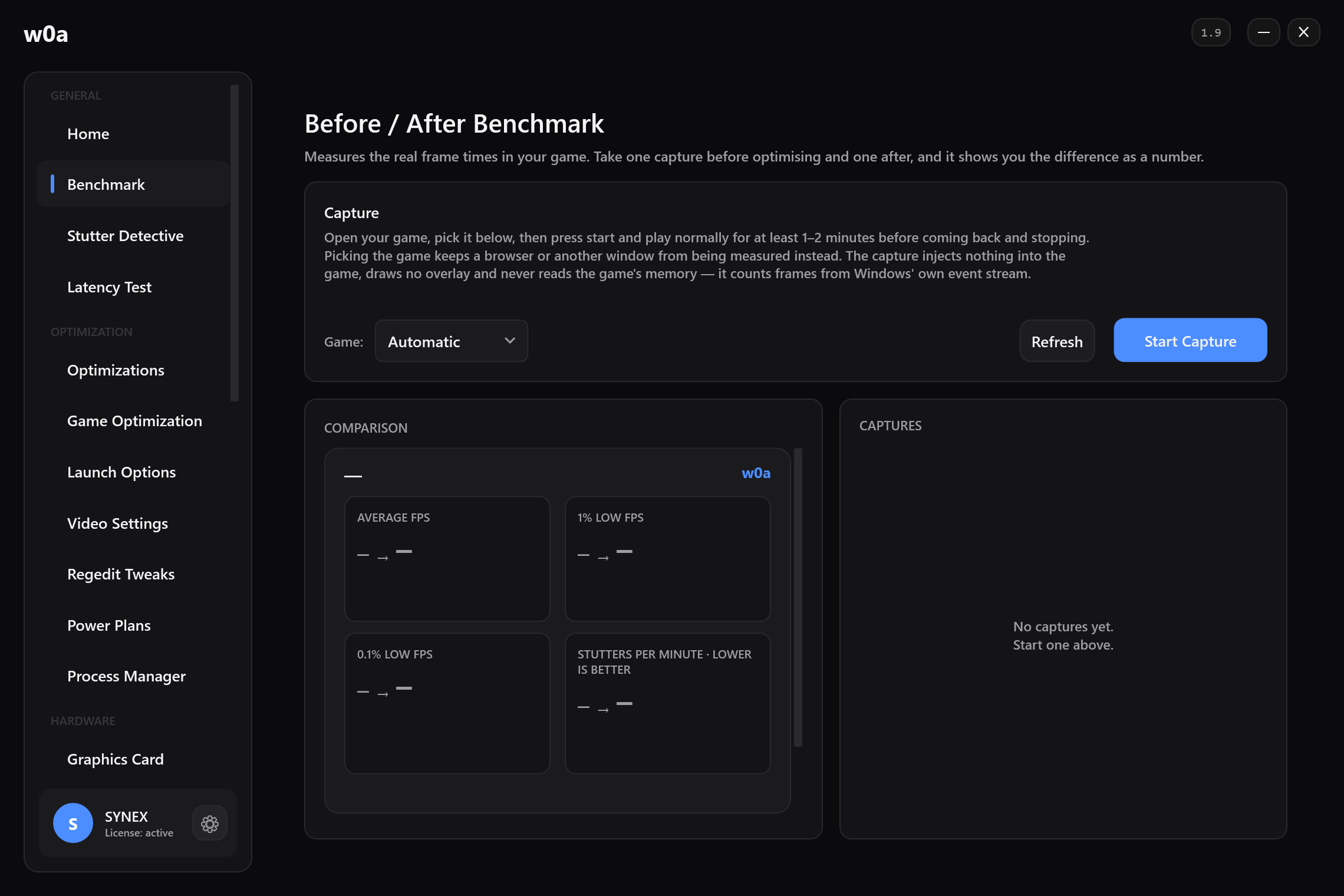
You cannot measure end-to-end latency without a camera. You can measure whether a change helped, and that is usually the question you actually have.
- Fix the free hardware problem first. Check the refresh rate is at maximum, the panel is at native resolution, and the monitor is in its low-latency picture mode.
- Take the floor. Run the Latency Test for the full 12 seconds and write down the System floor and its three parts.
- Take a baseline capture. Open Benchmark, record the same scene for a minute or two, and keep the average FPS, the 1% low and the stutter figure.
- Change one thing. One. Five changes and one measurement tells you nothing about which one mattered.
- Repeat steps 2 and 3 identically. Same scene, same settings, same background applications.
- Judge against your own noise. Run the unchanged configuration three times. If those three vary by more than the difference you are excited about, you found noise.
- Undo what did not move a number. That is what the Fix cards are for, and it is a better outcome than carrying a change that does nothing and telling other people it works.
If what you are chasing is an occasional jolt rather than a constant delay, what the stutter scan looks for is the right page — it labels each finding as proven, likely, a candidate or not checked, and it is deliberately honest about what it cannot see inside a game.
The summary, in one paragraph
Of the twelve stages between your finger and the photon, software can shorten three, and only when something is actually wrong with them. The largest remaining costs — the device's polling interval, the game's per-frame input read, the display's refresh interval and the panel itself — belong to hardware and to the game. A tool worth installing tells you which of the three it can reach are broken on your machine, measures what it honestly can, and refuses to estimate the rest. That is a smaller promise than the one you have been reading elsewhere, and it is the only one that survives a camera.
Related
- Why key presses feel late in games
- Why my aim feels delayed
- I hear footsteps after I see them
- Reading the latency test
- What the stutter scan looks for
- Reading the benchmark
Did this page help?
What was missing, or what did not work? We read every one of these.
If this page did not solve it, write to us — say which article you read, and we will fix the article.